Veo3 歌曲生成 API 对接说明
YoYAI 套餐明细(企业商业合作请联系邮箱:support@yoy-ai.com)
| 套餐等级 | 积分总量 | 优惠价格 (税前) | 税后价格 (加5.3%) | 折扣力度 |
|---|---|---|---|---|
| 基础版 | 100 | ¥98.0 | ¥103 | 9.8折 |
| 白银版 | 540 | ¥520.0 | ¥548 | 9.629折 |
| 黄金版 | 1,120 | ¥1050.0 | ¥1,106 | 9.375折 |
| 铂金版 | 6,000 | ¥5,450.00 | ¥5,739 | 9.083折 |
| 钻石版 | 13,000 | ¥11,400.00 | ¥12,004 | 8.769折 |
| 尊享版 | 25,200 | ¥21,550.00 | ¥22,692 | 8.551折 |
| 旗舰版 | 68,000 | ¥55,800.00 | ¥58,757 | 8.206折 |
| 至尊版 | 143,000 | ¥114,400.00 | ¥120,463 | 8.0折 |
注:只有在要求开具 6% 增值税专用发票时,才需按照“税后价格”进行结算。
积分消耗说明
视频生成与编辑 (基于 Model)
| 生成行为 (action) | 模型类别 (model) | 消耗积分 |
|---|---|---|
| image2video, text2video, extend | veo3, veo31 | 5 |
| veo3-fast, veo31-fast, veo31-fast-ingredients | 1.75 | |
| 其他模型 | 1.75 | |
| reshoot_video, insert_video, remove_video | / | 5 |
| 其他未明确指定的 action | / | 1.75 |
视频放大与处理 (基于upsample_type)
仅适用于 action 为 upsample_video 时。
| 生成行为 (action) | 放大类型 (upsample_type) | 消耗积分 |
|---|---|---|
| upsample_video | get4k | 5 |
| get1080p | 0.175 | |
| getgif | 0.01 | |
| 其他 | 1.75 |
基本使用
想些什么视频,可以任意输入一段文字,比如我想生成一个关于woman的视频,就可以输入 新年快乐,下面使用apifox进行发送请求,具体的参数如下所示:
{
    "action":"text2video",
    "model":"veo2-fast",
    "prompt":"woman"
}传入参数的字段说明如下:
- action 生成视频的行为参数,主要包含文生视频
text2video,以及图生视频image2video,默认是文生视频。 - prompt:生成视频的提示词。
- video_id:生成视频的提示词。
- model:视频模型的类别,主要包含了
veo2、veo2-fast、veo3、veo3-fast、,默认是veo2。 - image_urls:当视频任务是图生视频时,该值是必填参数,它是首尾帧的图片链接数组。
可以点击测试按钮直接测试 API,稍等 1-2 分钟,结果如下:
{
    "success": true,
    "task_id": "446344aa-b990-44bf-a136-366ba7937496",
    "trace_id": "7624d3c8-a0ee-4f5a-a1a7-a714c630ab21",
    "data": [
        {
            "id": "234c26e3118c40e0aa1782fc9b21e6b2",
            "video_url": "https://mountsea.oss-cn-hongkong.aliyuncs.com/veo3_videos/20250721_184004_234c26e3118c40e0aa1782fc9b21e6b2_standard.mp4",
            "created_at": "2025-07-21 10:38:38",
            "complete_at": "2025-07-21 10:39:58",
            "state": "succeeded"
        }
    ]
}可以看到这时候我们就得到了两首歌的内容,包括标题、预览图、歌词、音频、视频等内容。
字段说明如下:
- success:生成是否成功,如果成功则为
true,否则为false - data:是一个列表,包含了生成的视频的详细信息。
- state: 视频生成状态,主要包含四种,具体的如下:
- succeeded:生成成功
- running:执行中
- error:失败
- id:视频 ID
- complete_at:视频任务完成的时间
- video_url:视频的视频文件,打开就是一个 mp4 视频。
- created_at:创建的时间
- state: 视频生成状态,主要包含四种,具体的如下:
图生视频任务
如果想自定义首尾帧图片来生成视频,可以输入以下参数:
{
    "action":"image2video",
    "model":"veo2-fast",
    "prompt":"Let this little bear dance.",
    "image_urls":["https://cdn.yoy-ai.com/rv9d6n.png"]
}最后发送请求,可以发现会得到一个结果,如下:
{
    "success": true,
    "task_id": "ab82a390-ab1f-4a35-bbe9-a861c224dfb3",
    "trace_id": "ca743c39-371a-4919-9fa9-7afe03d333a6",
    "data": [
        {
            "id": "bc834f6b34654c219cf60978c824b937",
            "video_url": "https://mountsea.oss-cn-hongkong.aliyuncs.com/veo3_videos/20250721_184907_bc834f6b34654c219cf60978c824b937_standard.mp4",
            "created_at": "2025-07-21 10:47:38",
            "complete_at": "2025-07-21 10:48:58",
            "state": "succeeded"
        }
    ]
}获取1080p视频结果
如果想获取上面生成的1080p视频结果的话,可以输入以下参数:
{
    "action": "1080p",
    "video_id": "357c0bd7409844f3a8a8733cd36c8fd7"
}上面的video_id是基本使用生成的视频ID,最后发送请求,可以发现会得到一个结果,如下:
{
    "success": true,
    "task_id": "ce1c5967-89b0-4381-a3b6-4fc7b9a966bb",
    "trace_id": "4bc0d33a-0e07-4723-a9fb-d7dba5a8ce3b",
    "data": [
        {
            "id": "357c0bd7409844f3a8a8733cd36c8fd7",
            "video_url": "https://mountsea.oss-cn-hongkong.aliyuncs.com/veo3_videos/20250722_110443_357c0bd7409844f3a8a8733cd36c8fd7_1080p.mp4",
            "created_at": "2025-07-22 03:02:06",
            "complete_at": "2025-07-22 03:03:06",
            "state": "succeeded"
        }
    ]
}设置视频生成的尺寸与翻译功能
如果想指定视频尺寸以及自动翻页来生成视频的话,可以输入以下参数:
{
    "action": "image2video",
    "prompt": "它开心的跳起了舞蹈",
    "model": "veo3-fast",
    "translation": true,
    "aspect_ratio": "4:3",
    "image_urls": [
        "https://cdn.yoy-ai.com/rv9d6n.png"
    ]
}上面的aspect_ratio是视频的尺寸大小,目前支持:16:9、9:16、3:4、4:3、1:1,默认值是16:9。最后发送请求,可以发现会得到一个结果,如下:
{
    "success": true,
    "task_id": "a8038afb-482a-4452-b6d1-72febf9b7f21",
    "trace_id": "1264fe1e-dd7b-4677-88b2-6d1a0ec4631a",
    "data": [
        {
            "id": "33e403826a6145e88b3b738fb3d6458e",
            "video_url": "https://cdn.sunohub.cn/suno/a8038afb-482a-4452-b6d1-72febf9b7f21.mp4",
            "created_at": "2025-08-25 10:05:04",
            "complete_at": "2025-08-25 10:07:04",
            "state": "succeeded"
        }
    ]
}提示词优化功能
如果你不知道如何填提示词的画,可以使用我们提示词优化接口,可以输入以下参数:
{
    "prompt": "Cutting from the rooftop, gentle pull-back reveals the empty intersection as lights bloom in rhythmic halos and puddles ripple to the carried beat."
}上面的prompt是你需要优化的提示词内容。最后发送请求,可以发现会得到一个结果,如下:
{
    "success": true,
    "task_id": "cb98639b-f27d-4a0d-88ef-da97bb8b28bb",
    "trace_id": "1b99a6c9-81c9-4b67-a106-7d1eb8f7596f",
    "data": {
        "enhancement_prompt": "**Scene:** A gentle camera pullback from a rain-slicked rooftop reveals an empty, urban intersection at dusk, illuminated by rhythmic streetlights and disturbed by a distant bass beat.\n\n**Visuals:** The subject is an **empty, rain-slicked, four-way urban intersection** at night, framed by the surrounding architecture of 1940s-style brick and concrete buildings. The ground is a uniform, dark asphalt, filled with scattered, reflective puddles. The mandatory Living Diorama aesthetic is applied: everything, from the asphalt and the standing water to the base of the lampposts and the texture of the building facades, is rendered in **highly-detailed molded plastic** with a pervasive, slightly oily **semi-gloss finish**. The few streetlights visible are miniature, stylized models emitting a soft, blooming yellow-white light. **Clean, visible articulation joints** are subtly integrated into the corners of the pavement slabs and the mounting brackets of the traffic lights, suggesting the city is a gigantic, assembled model kit.\n\n**Camera:** **Medium Establishing Shot (Pullback).** Starting tight on the wet asphalt and a single reflective puddle (the \"rooftop\" from the prior implied cut), the camera smoothly and slowly pulls back and slightly tilts down (low to medium angle), establishing the scale and emptiness of the intersection. No panning or jarring movements.\n\n**Audio:** The soundscape is dominated by a persistent, distant, rhythmic thrum overlaid by environmental moisture sounds.\n\n**SFX:**\n* **Distant, repetitive low-frequency thrum:** (Source: Carried, deep bass beat from a faraway, unseen location, felt more than heard.)\n* **Slight water splash/ripple:** (Source: The rhythmic impact of the bass disturbing the surface tension of the nearby puddles, a very soft, wet 'tick-tick-tick' accompanying the beat.)\n* **Subdued constant hiss:** (Source: The residual sound of light rain or mist falling onto the hot, wet asphalt.)\n* **Distant, echoing vehicular traffic:** (Source: Barely audible tire hums and engine noise from surrounding blocks.)\n\n**Music:** None requested."
    }
}其中enhancement_prompt就是优化后的内容。
续写视频功能
如果你对已生成的视频继续二次扩展的话,可以使用续写视频的功能(目前支持veo31、veo31-fast模型),其中action应为extend,可以输入以下参数:
{
    "action": "extend",
    "prompt": "让它和鸭子在水上跳舞",
    "model": "veo31-fast",
    "video_id": "b4fe3d02-bc02-46af-91d5-d8c7d08b4e3d"
}上面的video_id是已生成的视频ID,具体可以参考上面生成教程,model参数目前只支持:veo31、veo31-fast。最后发送请求,可以发现会得到一个结果,如下:
{
    "success": true,
    "task_id": "0ba7edc6-1bef-4441-8f23-3054b8c3b237",
    "trace_id": "4dfc6f25-f34a-40a8-89ad-39513e8739a6",
    "data": [
        {
            "id": "b1fe976d-1370-406a-9170-0f156b2189ea",
            "video_url": "https://cdn.sunohub.cn/suno/0ba7edc6-1bef-4441-8f23-3054b8c3b237.mp4",
            "created_at": "2026-03-17T17:22:42.739Z",
            "complete_at": "2026-03-17T17:24:52.782Z",
            "state": "succeeded"
        }
    ]
}提升视频画质的功能
如果你对已生成的视频画质不满意的话,可以使用提升画质的功能,其中action应为upsample_video,可以输入以下参数:
{
    "action": "upsample_video",
    "upsample_type": "getgif",
    "video_id": "b4fe3d02-bc02-46af-91d5-d8c7d08b4e3d"
}上面的upsample_type是视频的画质选择,目前支持:get1080p、get4k、getgif。最后发送请求,可以发现会得到一个结果,如下:
{
    "success": true,
    "task_id": "c5a7a194-1b35-46e0-9434-0a0149fd18d8",
    "trace_id": "e8f0a1e6-abdc-46a9-bb18-d211ba51f8c0",
    "data": [
        {
            "id": "5324723d-bc7f-4bc2-9082-3b6573f44937",
            "video_url": "https://cdn.sunohub.cn/suno/c5a7a194-1b35-46e0-9434-0a0149fd18d8.gif",
            "created_at": "2026-03-17T17:10:05.380Z",
            "complete_at": "2026-03-17T17:11:05.410Z",
            "state": "succeeded"
        }
    ]
}异步回调
由于 Veo3 生成视频的时间相对较长,大约需要 1-2 分钟,如果 API 长时间无响应,HTTP 请求会一直保持连接,导致额外的系统资源消耗,所以本 API 也提供了异步回调的支持。
整体流程是:客户端发起请求的时候,额外指定一个 callback_url 字段,客户端发起 API 请求之后,API 会立马返回一个结果,包含一个 task_id 的字段信息,代表当前的任务 ID。当任务完成之后,生成音乐的结果会通过 POST JSON 的形式发送到客户端指定的 callback_url,其中也包括了 task_id 字段,这样任务结果就可以通过 ID 关联起来了。
下面我们通过示例来了解下具体怎样操作。
首先,Webhook 回调是一个可以接收 HTTP 请求的服务,开发者应该替换为自己搭建的 HTTP 服务器的 URL。此处为了方便演示,使用一个公开的 Webhook 样例网站 https://webhook.site/,打开该网站即可得到一个 Webhook URL,如图所示:

将此 URL 复制下来,就可以作为 Webhook 来使用,此处的样例为 https://webhook.site/03e60575-3d96-4132-b681-b713d78116e2。
接下来,我们可以设置字段 callback_url 为上述 Webhook URL,同时填入 prompt,如图所示:
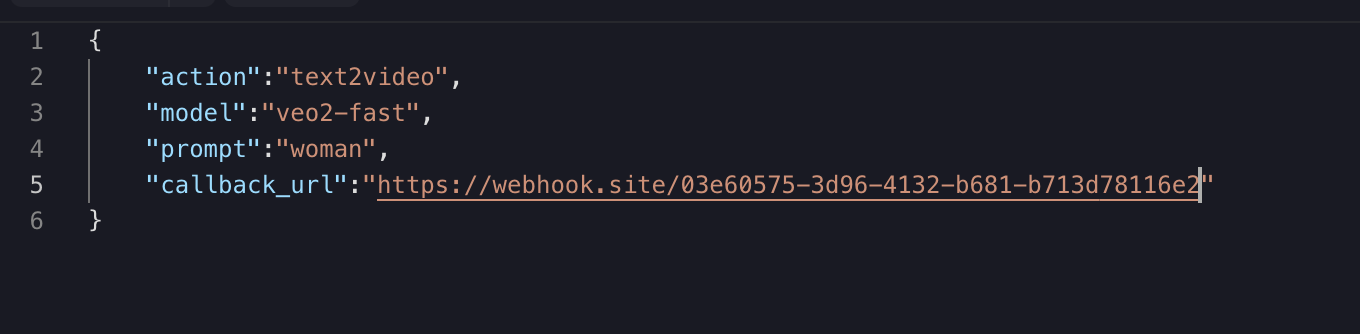
点击运行,可以发现会立即得到一个结果,如下:
{
  "task_id": "446344aa-b990-44bf-a136-366ba7937496"
}稍等片刻,我们可以在 https://webhook.site/03e60575-3d96-4132-b681-b713d78116e2 上观察到生成歌曲的结果,如图所示:
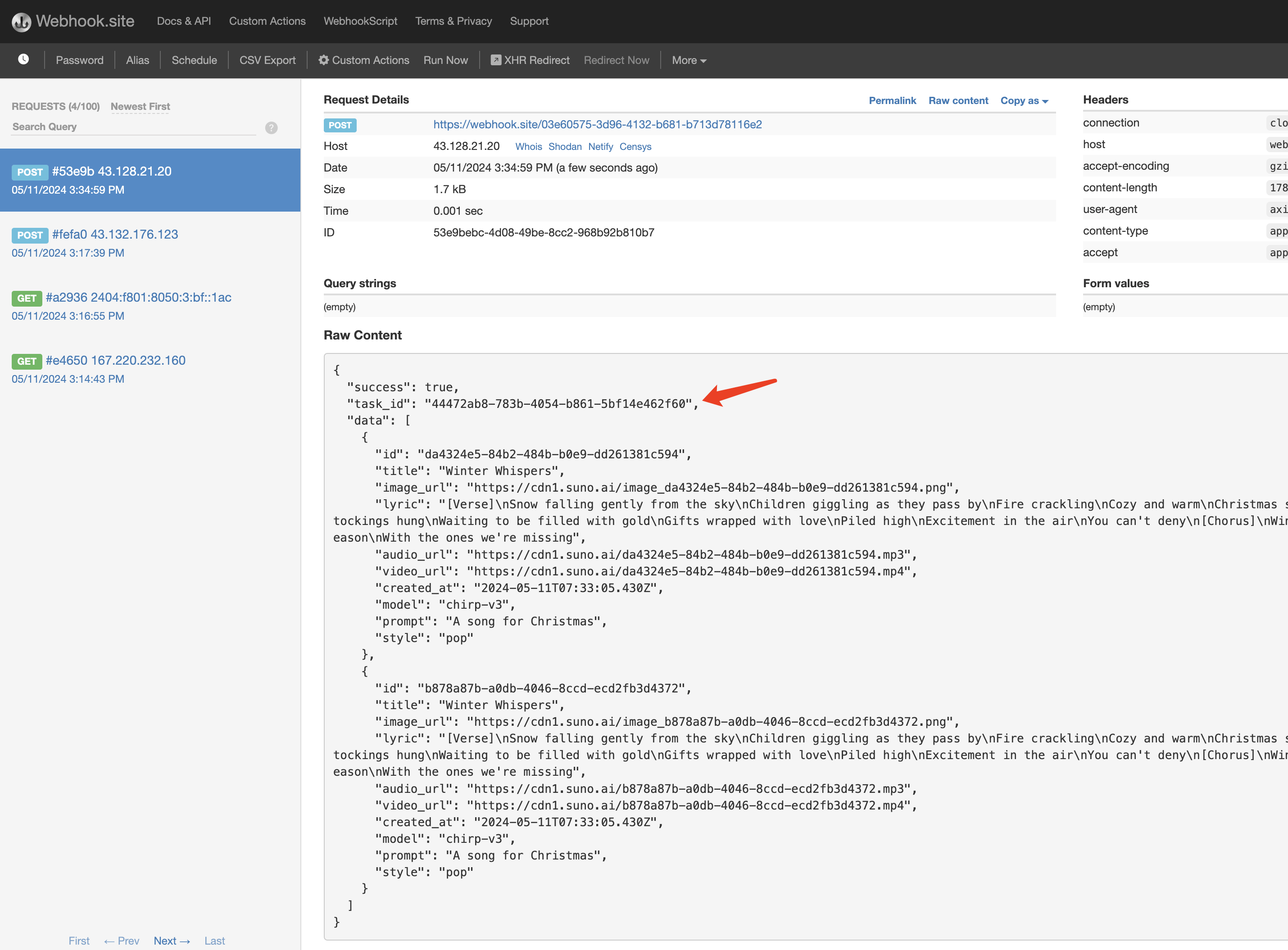
内容如下:
{
    "success": true,
    "task_id": "446344aa-b990-44bf-a136-366ba7937496",
    "trace_id": "7624d3c8-a0ee-4f5a-a1a7-a714c630ab21",
    "data": [
        {
            "id": "234c26e3118c40e0aa1782fc9b21e6b2",
            "video_url": "https://mountsea.oss-cn-hongkong.aliyuncs.com/veo3_videos/20250721_184004_234c26e3118c40e0aa1782fc9b21e6b2_standard.mp4",
            "created_at": "2025-07-21 10:38:38",
            "complete_at": "2025-07-21 10:39:58",
            "state": "succeeded"
        }
    ]
}可以看到结果中有一个 task_id 字段,其他的字段都和上文类似,通过该字段即可实现任务的关联。